For Nursing, Medical Laboratory Science & other health-science students

A cozy place to study.
A confident way to pass.

Self-paced board and subject reviews, written and checked by licensed nurses and medical technologists. Use it in the browser on your phone, tablet or computer, or install it on your PC, and study at your own pace.

Reviewed by licensed RNs & RMTs 1-month access, no auto-renew 100% self-paced
Our apps

Eight nests for every stage of your course.

Each app is its own review. Enroll only in the ones you need — from core subjects like Anatomy & Physiology and Pharmacology to your board exam.

Board exam reviews For graduates and graduating students

Nursing

NurseNest

NCLEX review for Nursing graduates
NCLEX Review — practice questions with full rationales
Think like the exam — prioritization, delegation and clinical judgment, the questions students find hardest
Know why, not just what — every answer checked by licensed RNs
Review on your schedule — any device, monthly, never auto-renews

NLENest

Philippine Nurse Licensure Exam (PRC nursing board exam)
Philippine nursing board exam review — Nursing Practice I to V, like the PRC NLE
Coming soon — new practice questions are being added

Medical Technology

MTLENest

Board review for the Medical Technologist Licensure Exam (MTLE)
MTLE Review (PRC) — built for the PRC Medical Technologist Licensure Exam
For the international ASCP and AMT exams, see MLSNest (ASCP) and MLSNest (AMT)

MLSNest (ASCP)

Review for the ASCP MLS certification exam
ASCP-style review — subjects and mock exams follow the ASCP MLS exam (100 questions, 2 h 30 min)
Coming soon — new practice questions are being added

MLSNest (AMT)

Review for the AMT MLS certification exam
AMT-style review — subjects and mock exams follow the AMT MLS exam (210 questions, 3 h 30 min)
Coming soon — new practice questions are being added

Nurse Practitioner reviews For NP students in graduate school

NPNest(NR569 CEA)

Nurse Practitioner exam review for the NR569 CEA (acute care)
Pre-clinical diagnostic exam review — differential diagnosis, diagnostics and first-line management in acute care
Know why, not just what — every answer has a rationale and its guideline source
Coming soon — new practice questions are being added

Subject study For any year level — pick your own starting point

AnaPhyNest

Anatomy & Physiology, the whole subject
Whole-subject Anatomy & Physiology review
For Nursing and MLS students at any year level, with a Nursing and an MLS angle on every topic

PharmaNest

Pharmacology, the whole subject
Whole-subject Pharmacology review
For any health-science course — Nursing, Pharmacy, Midwifery, MLS and more — at any year level

Every app runs in the browser on your phone, tablet or computer, and can be installed on a PC · needs internet · more nests hatching soon

How it works

Enroll in three easy steps

1

Choose your app

Each app is a separate review. Enroll only in the ones you need.

2

Subscribe for 1 month

One payment, one month of access. No auto-renewal — you renew only if you want more time.

3

Study at your own pace

Log in to your app from the browser on your phone, tablet or computer, or install it on your PC. No live classes — review whenever you're online.

Why the Nest

Made by professionals who've sat the boards.

Licensed reviewers

Every question and rationale is written or checked by licensed RNs and Medtechs.

Rationales, not just answers

Understand why the right answer is right, and why the others aren't.

Self-paced, always

No webinars, no schedules. Your review fits around your duty, class or shift.

Pay only for what you use

Monthly access per app, with no surprise renewals.

Pricing

Simple monthly access

Each app is priced separately. Every plan is 1 month of access and does not renew automatically.

Board exam reviews For graduates and graduating students

Nursing

NurseNest

NCLEX Review

₱…/ month
Enroll
NLENest

Philippine Nurse Licensure Exam

₱…/ month
Enroll

Medical Technology

MTLENest

MTLE Board Review

₱…/ month
Enroll
MLSNest (ASCP)

ASCP MLS Exam Review

₱…/ month
Enroll
MLSNest (AMT)

AMT MLS Exam Review

₱…/ month
Enroll

Nurse Practitioner reviews For NP students

NPNest (NR569 CEA)

NR569 CEA Review

₱…/ month
Enroll

Subject study For any year level

AnaPhyNest

Anatomy & Physiology

₱…/ month
Enroll
PharmaNest

Pharmacology

₱…/ month
Enroll

Your account, your review

Our reviewers work hard on every question. To keep the content fair for everyone who pays for it:

One student, one accountUse on up to 2 of your own devices, one login at a time.
Personal watermarkAn invisible mark on every question links any screenshot back to your account.
No sharing or copyingScreenshots, reposting and account sharing are not allowed and lead to account removal.
Protected contentAll questions and rationales are the copyrighted property of The Reviewers' Nest.
FAQ

Questions from the nest

Do I need to enroll in all four apps?

No. NurseNest, MTLENest, AnaPhyNest and PharmaNest are separate apps with separate subscriptions. Enroll only in the ones you need.

Can I try before I pay?

Yes. Every board exam app has 50 free sample questions, and AnaPhyNest and PharmaNest have 10, all with answers and rationales. Create a free account and tap "Try free questions" on the app you are interested in. Each free question can be answered once.

Can I install the app?

On a PC (Chrome or Edge) — your app gets its own window and desktop icon.

  1. Open your app, for example thereviewersnest.com/nursenest/ (or /mlsnest/, /anaphynest/, /pharmanest/). At the right end of the address bar, click the install icon.Install icon at the right end of the Chrome address bar
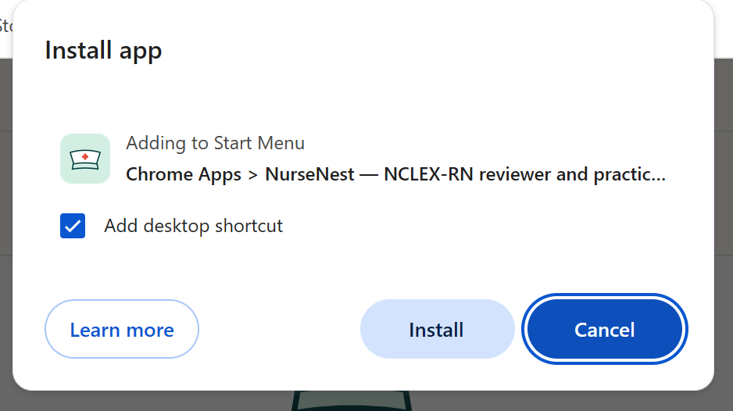
  2. Click Install. Keep "Add desktop shortcut" ticked if you want an icon on your desktop.Install app window with the Install button
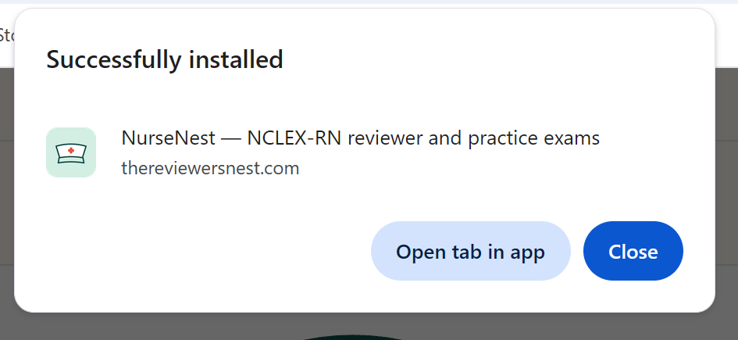
  3. Click Close (or "Open tab in app" to start now).Successfully installed message
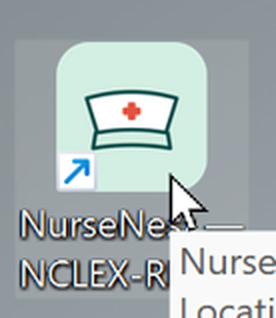
  4. Open it any time from the desktop icon or your Start menu.NurseNest icon on the desktop

No install icon? In Chrome click ⋮ → Cast, save and share → Install page as app. In Edge click ⋯ → Apps → Install this site as an app.

iPhone or iPad (Safari) — save a shortcut with our logo.

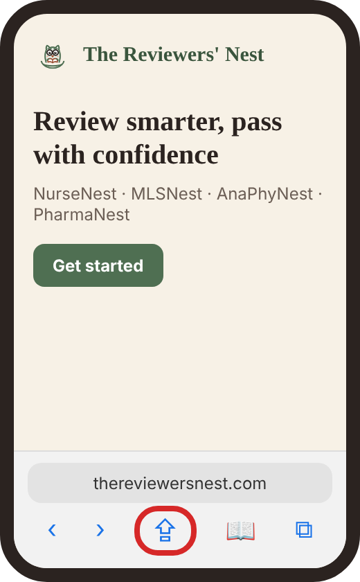
  1. Open thereviewersnest.com and tap Share.Share button in Safari
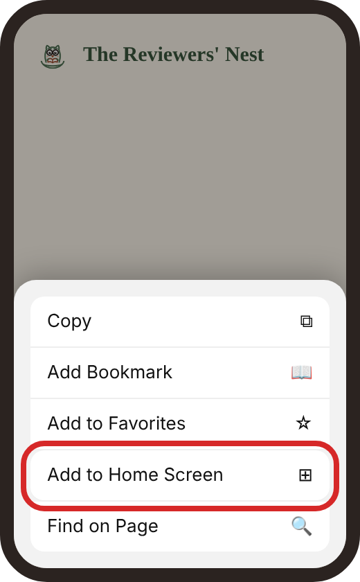
  2. Tap Add to Home Screen.Add to Home Screen in the share menu
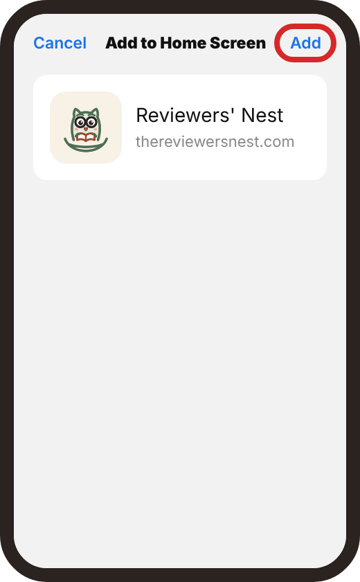
  3. Tap Add.Add to Home Screen screen with the Add button
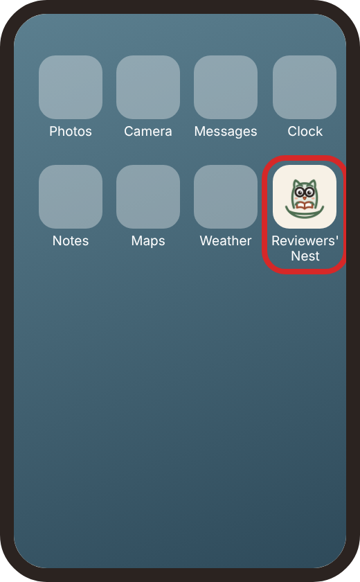
  4. Tap the owl icon any time to open the site.Reviewers Nest icon on the home screen

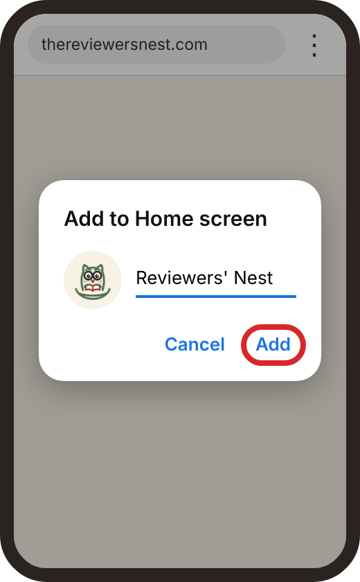
Android (Chrome) — save a shortcut with our logo.

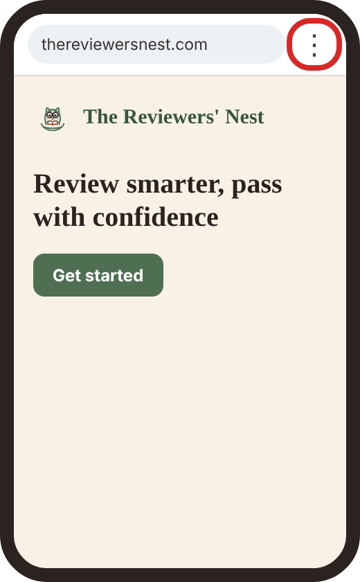
  1. Open thereviewersnest.com and tap ⋮.Three-dot menu in Chrome
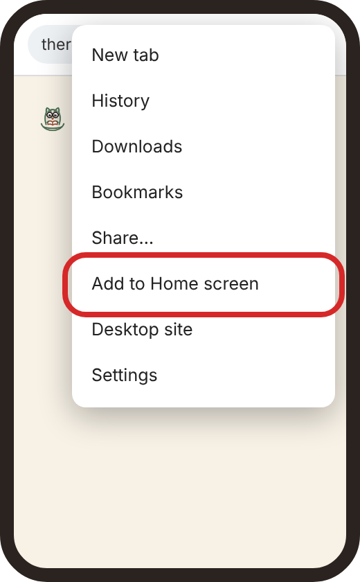
  2. Tap Add to Home screen.Add to Home screen in the Chrome menu
  3. Tap Add (and Add again if your phone asks).Add to Home screen box with the Add button
  4. Tap the owl icon any time to open the site.Reviewers Nest icon on the home screen

Pictures are a guide; your screens may look slightly different. For the best experience, use Chrome, Safari or Edge. Opera Mini's data-saving mode can stop the apps from working; if you use it, turn data saving off.

Can I study offline?

No. You need an internet connection, because questions load securely from our server each time you study. This keeps the review bank protected and always up to date.

Are there live classes or webinars?

No. Everything is self-paced, so you can study anytime within your access month.

Will I be charged again automatically?

No. Each subscription lasts 1 month and ends on its own. Renew only when you want to.

Does MTLENest cover the ASCP exam?

MTLENest is for the PRC Medical Technologist Licensure Exam. For the international ASCP and AMT exams, we have two separate apps, each priced separately: MLSNest (ASCP) and MLSNest (AMT).

Can I use it on more than one device?

Yes, up to 2 of your own devices, signed in one at a time.

How do I pay?

[PAYMENT METHODS — e.g. GCash, Maya, card]